Email is a strange beast. It’s been buried for the past 10 years, but it’s still working hard, generating sales, leads, and repeat purchases. And there’s one critical point in literally every marketing email: the link. It’s what determines whether the next click, conversion, or “404” happens.
Most teams treat links utilitarianly. They put UTM on half the screen, ESP will track something there, Google Analytics will then calculate it. And now it seems that the system is working. However, it doesn’t do this for long…
The problem becomes noticeable exactly at the moment when something goes wrong. The landing page does not open, the redirect gets stuck, the page returns an error, and the letter has already been delivered to mailboxes. And then it suddenly turns out that there is no checkpoint between “we sent the campaign” and “the user bought”.
That’s why a short link in an email is not so much about aesthetics or compactness, but about the ability to control the route. It’s critically important to see the click before going to the site, to be able to change the goal, and not depend on chance. Because the path “letter → site → money” should work like a Swiss watch, not a roulette wheel.
Where the real problems with email links arise
Fakapas with email links almost never look like a disaster. Nobody raises the alarm, servers don't crash, nobody writes in Slack "everything is on fire." Fakapas are always quiet. Conversion just "for some reason" creeps down. Traffic seems to be there, openings are normal, CTR is not a shame to show at a rally, but in the meantime, money is getting less and less.
Typical scenarios are painfully familiar:
A 300-character UTM link that looks like a Wi-Fi password in a cafe and arouses suspicion even before the click.
An ESP redirect that wraps its tracking on top of yours, and as a result, the chain of transitions looks like a quest.
A corporate security filter that blocks a “strange” domain before the user even sees anything.
A landing page that returns 500 after deployment because someone “quickly filled in the fix before sending.”
Google Analytics only sees in this story those who actually reached the site. If the page didn’t open, for GA this person doesn’t exist. And you look at the numbers and think: “Why is the CTR normal, but there are no sales?”.
The problem is often not in the creative, not in the offer, or even in the copywriting. The problem is with the link. And if there is no separate point of control between the letter and the site, you will be the last to know about it.
What is a short link in the context of email?
In the context of email, a short link is not just a redirect. It is a buffer between the email and the website. A checkpoint that lives before web analytics.
ESPs (Mailchimp, Sendgrid, eSputnik, etc.) also count clicks. But they count them within their own system. You don't always see the full chain of redirects, you can't change the target without editing the email, and you don't control the behavior after publishing.
A short link allows you to:
record the fact of the click;
see the source;
manage the final page;
change direction without resending.
In the case of email, this is critical. The letter has already gone out. You can't revoke it. The only thing you really control after sending is the link. If it's controlled, you're calmer. If it's not, you're at the mercy of chance.
Architecture: How to properly embed short links into the email process
The correct scheme looks almost too simple on paper: Email → Short link → Landing → GA → CRM. It sounds very logical, but in reality it is at the junction between these blocks that everything breaks down.
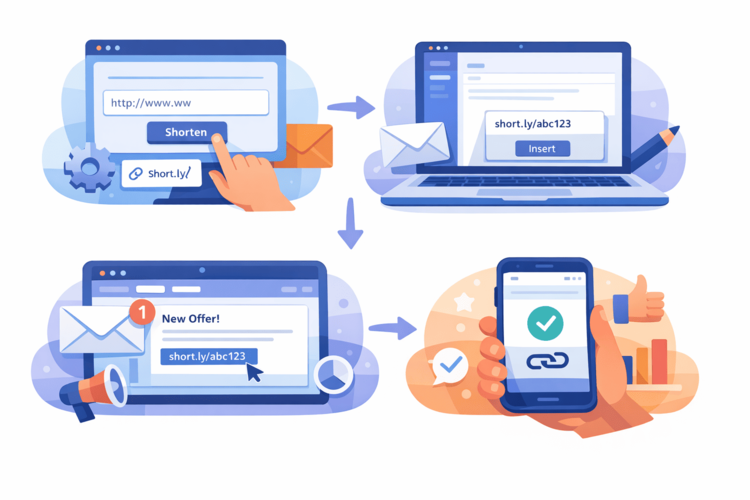
A short link is not “prettier than UTM,” but a full-fledged separate layer between the email and the website. It should live its own life: record the fact of a click, quickly redirect without unnecessary dances, allow you to change the target if something goes wrong, and show adequate statistics without a quest from three systems.
If a short link is just another redirect in a chain of five, it makes little sense. If it is a checkpoint, then management comes into play. In large teams, links cease to be a “marketing trifle”. They become part of the infrastructure, like DNS or CDN. Nobody brags about them in a presentation, but when they work stably, then everything else works too.
And another point that is often underestimated is that testing should not be done on the principle of “it opens on my device.” You need to go all the way from Gmail and Outlook to the mobile client and corporate email with filters. Because what clicks beautifully in your Chrome may behave completely differently in Outlook 2016 under an antivirus from the dinosaur era.
Step-by-step implementation instructions
If you are going to implement short links in emails, do it as a process, not as an experiment in a single mailing.
Step 1. Audit
Start with a simple but painful question: How many links do you actually use? Where are they stored? Who has access? Is there any system in place?
If short URLs live “somewhere in the marketer’s clipboard” or in the browser history, you are at risk. Links from newsletters often live for years, so they need to be found, described, and understood by the entire team.
Step 2. Structure
Without structure, chaos sets in. In three months, you won’t remember what sale_final_new2 is or how it’s different from sale_final_new3. Implement a naming logic, such as:
email_blackfriday_2026_btn1;
email_trial_april_footer.
The title should immediately answer three questions:
Where is the link from?
Which campaign does he belong to?
Where is it used in writing?
This is absolutely not a story about perfectionism, but about not playing detective in six months.
Step 3. Integration
Replace raw UTMs in templates with short URLs. Check how they handle ESP tracking. Some platforms sometimes add their own redirect. So make sure there is no endless “redirect within redirect”.
Step 4. Test
Before pressing “Send”, do a minimal sanity check:
check all the buttons in the letter;
test the transition from mobile;
see if the redirect takes forever;
make sure the landing page responds with a 200, not “oh, we’re deploying something.”
It literally takes 10–15 minutes, but often literally saves the campaign, the budget, and the nerves of the entire team.
Analytics: what to really measure
Short links add another layer of visibility – what happens to the site. Not after the page loads, not in Google Analytics, but at the moment of the click. And this is often the most valuable part of the whole story.
With this approach, you start to see not just “there is traffic / there is no traffic”, but specifics:
do they click at all, or does the button just sit nicely in the letter?
which button or block in the letter gives more conversions;
how different audience segments react;
Does some of the users disappear before the site even has time to open?
These are small but critical things. For example, there are clicks, but there are fewer sessions in GA – it means that the problem is in the redirect or on the side of the page. If there are few clicks – the problem is in the letter itself, in the headline, offer, CTA. And you see it immediately, and not after a week of “analysis”.
Without this level of control, you are operating half-blind.
Common mistakes
The most popular short link facapas usually don't look like anything dangerous. They seem like little things, but that's where the chaos begins. Typical scenarios:
One short link for several campaigns. As a result, you don’t understand what exactly worked and what just “gave clicks somewhere.”
Loss of access to the account. The person left the team - the links were left orphaned.
Lack of checking of old links. They live in letters from a year ago, but they no longer lead to the wrong place.
Ignoring click statistics. The data is there, but no one is looking at it.
At first glance, it doesn't seem critical. What's the point? Links and links. But a short URL is not a one-time button, but a full-fledged asset. It outlives the campaign, the manager, and often the version of the site itself. If you treat it as a temporary crutch, it will fail sooner or later. And, according to the law of meanness, it will do so not on a quiet Friday evening, but in the midst of a large mailing.
Advanced: What teams that are scrambling do
More advanced teams see short links not as a “convenience” but as a management tool. They use them not only for tracking, but for real-time decision-making.
Here's where it really works:
A/B testing of buttons within one email – a separate link for each CTA to understand what exactly is being clicked.
Different audience segments – their own short URL for new users, their own for regular users, to see the reaction separately.
Quick offer switching – if the conditions have changed, the target can be updated without re-sending.
Stopping traffic in case of a bug – if the landing page is down, the redirect can be changed or disabled until the team fixes the problem.
These teams don’t wait for Google Analytics to “draw” strange numbers in a few hours. They see the situation at the click level and can react immediately. This is not magic or overengineering. It’s just control at a stage where most companies still hope that “it just works.”
When short links really save
Imagine the situation – you sent 50,000 emails. The campaign is hot, traffic is up, managers are already preparing for the influx of applications. And then an hour later it turns out that the landing page returns a 500 error. Deployment, cache, failed update – it doesn't matter. The fact is that traffic is flying into the wall.
Without a short link, you won't do anything, because the email is already in the mailboxes. With a short link, you can easily change the target in a few minutes and save at least some of the transitions.
Or another case: the terms of the promotion have changed, or you need to urgently restrict access by region or redirect traffic to a backup page. All this is solved at the link level, without resending and without “oh, we updated the terms, here is a new link”.
This is not a nice feature, but real insurance. And, honestly, it's quite inexpensive compared to the cost of one big mistake.
Are short links always needed in email?
No, not always. If it’s a test mailing for 200 people, then you can do without an additional level of control. If it’s an internal email in the team, even more so. But when it comes to regular campaigns, automatic chains, large-scale launches, large databases, short links are no longer an option. They become part of the architecture, like CDNs or backups. You can live without them right up until the first problem. In such cases, link shortening services such as Surl.li become not just a convenience, but a tool for control, analytics, and stability of the entire mailing.
Conclusion: whoever controls the link controls the customer journey
Email is a channel with a long memory. Links in it live for years. And if you want a system, not a set of random sendings, control must be at every stage. Google Analytics will show what happened on the site. A short link will show what happened to the site and will give you the opportunity to intervene if something went wrong.
In 2026, the winners will not be those who send more emails, but those who see the entire customer journey – from the click in the inbox to the action on the page. And you can manage this journey, not just watch the graphs.